
Who Is This Automation For?
- Grant researchers: stop opening tabs to compare funder pages - paste each URL and get the key facts pulled out for you;
- Program managers: get quick summaries of partner websites, policy updates, or news articles;
- Volunteer coordinators: scan event pages and community posts fast so you can brief your whole team in minutes;
- Consultants: read client websites before discovery calls - the summary lands in chat while you pour your coffee;
- Small business owners: research competitors or suppliers by dropping their URLs in and reading a short digest instead of the full site.
Common Use Cases
- Funding research: paste a foundation's grant page URL and get a clear breakdown of eligibility criteria, deadlines, and focus areas;
- Competitor monitoring: drop a competitor landing page into the chat and receive a structured summary of their offer and positioning;
- Content curation: scan blog posts or articles your audience cares about, then use the summaries to plan your own newsletter;
- Due diligence: check a potential partner's website before a meeting and walk in knowing exactly what they do and who they serve;
- Policy tracking: feed in government or regulatory pages and get the main points without wading through legal language yourself.
How It Works
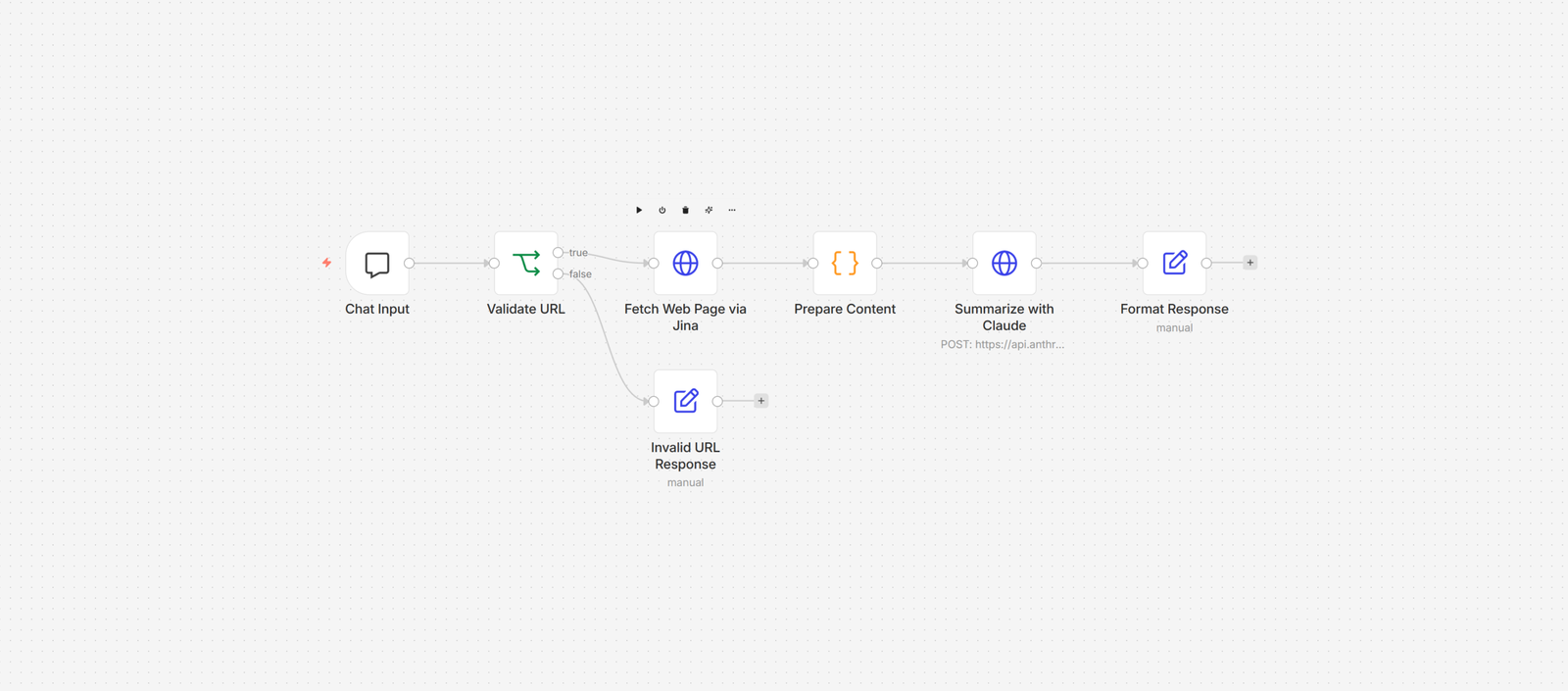
You start by giving the workflow a URL. It can come from a chatbot window, a webhook call, or whatever trigger fits your setup. The workflow does not care where the URL comes from - it just needs one.
Once the URL passes validation, a web reader service fetches the page and converts it into clean, readable text. All the ads, navigation menus, and clutter get stripped away. You are left with just the content - kind of like hiring someone who only reads the good parts of a book out loud.
That clean text goes to an AI model along with the page title and URL. The AI reads everything and writes a short summary: what the page is about, what topics it covers, and the key takeaways worth remembering.
Finally, the summary gets formatted with the page title and source URL on top, so you always know where the information came from. The whole thing takes a few seconds. You could summarize a ten-page article in the time it takes to say "I'll read it later" - which, let's be honest, usually means never.
Prerequisites
You will need an automation platform, an AI service, and a web reading service.
(Automation: n8n, Make. AI: Claude API, OpenAI API. Web reading: Jina Reader, Firecrawl.)
How to Develop Further
- Batch processing: connect a spreadsheet trigger so the workflow reads a list of URLs from a file and summarizes them all at once;
- Custom prompts: swap the summary prompt for one that extracts specific data points - prices, dates, contact info - whatever you need;
- Save to database: add a storage node after the summary step to keep every result in Airtable, Notion, or Google Sheets for later;
- Scheduled monitoring: attach a cron trigger to re-scrape the same URLs weekly and flag when the content changes since last time;
- Team notifications: wire the output into Slack or email so the summary goes straight to the people who need it, not just you.