
Who Is This Automation For?
- Fundraising managers: stop copying 50 donor names from a shared sheet into your CRM every Friday afternoon - this does it in one click;
- Program directors: your intake forms collect contacts all week but nobody follows up because they sit in a table nobody checks;
- Small business owners with no tech team: you should not need a developer to move contacts from a sheet to a CRM - pick, click, done;
- Operations leads: your team collects data in one place and does outreach in another - this bridges that gap for you.
Common Use Cases
- Donor import: volunteers add contacts to a shared sheet all month and this workflow pushes the ready ones to your CRM overnight;
- Post-event follow-up: after a gala you have 200 new names in a table - this sends them to your sales tool before Monday morning rolls in;
- Grant prospect routing: pull new prospects from a central list and send them to each department's own tool without sorting by hand;
- Quarterly data cleanup: filter the leads marked ready, push them to your CRM, and mark them done so nobody processes them twice;
- CRM test drive: point it at a trial account to see how your data fits before you sign a contract - like trying on shoes before you buy.
How It Works
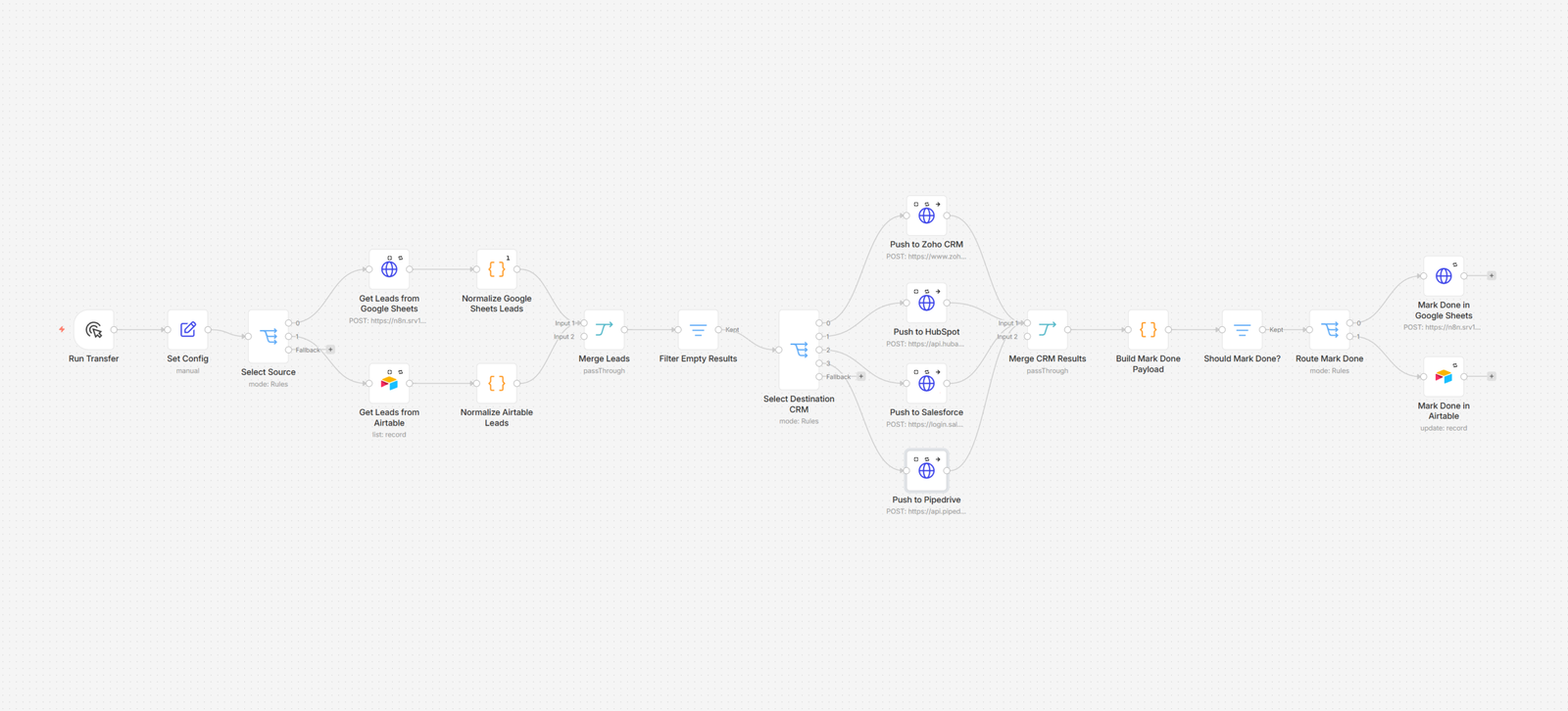
You tell the workflow two things: where your leads sit and where they should go. That is it. Pick a source - a sheet or a table - and pick a CRM. Press the button. The rest runs on its own. It grabs all contacts from your source and checks each one for a "Ready" tag. Not ready? Skipped. Only the names your team has reviewed get through. Next it cleans the data. Tools store names and emails in odd ways. This step lines them up so your CRM gets tidy rows. Your CRM will thank you, though it won't send a card. Then it sends each clean lead to your CRM. First name goes to first name. Email to email. No mix-ups. If one lead has a flaw, the rest still go through - no jam in the pipe. Last it goes back to your source and marks each lead "Done." The loop is closed. No one will handle the same name twice. Run it daily, weekly, or when you have a fresh batch.
Prerequisites
- You need a data source, a CRM, and a tool to run the workflow.
- Data sources: Google Sheets, Excel Online, Airtable, NocoDB;
- CRMs: Zoho CRM, HubSpot, Salesforce, Pipedrive;
- Automation tools: n8n, Make.
How to Develop Further
- Add email alerts on finish: wire a notification at the end so you get a short email showing how many leads moved and whether any failed;
- Include a deduplication check: add a lookup step that checks your CRM for existing contacts before pushing so you never create doubles;
- Schedule it to run on its own: swap the manual button for a cron trigger so leads transfer every night or every Monday with no clicks;
- Drop in more sources: add a new branch for your form builder or donation platform - the normalize-then-route pattern stays the same;
- Log every transfer to a sheet: send a summary row to a separate spreadsheet after each run so you have an audit trail of what moved.