
Who Is This Automation For?
- Fundraising managers: stop opening 14 tabs before coffee - get one email with the articles that actually matter to your pipeline;
- Grant writers: track new funding announcements across two news databases without bookmarking a single page or setting a reminder;
- Nonprofit directors: share a curated morning briefing with your board so everyone walks into standup knowing what happened overnight;
- Consultants: send clients a branded weekly digest;
- Small business owners: monitor your niche without paying for a clipping service or hiring someone to read the internet for you.
Common Use Cases
- Morning briefing: "AI and fundraising" articles land in your inbox at 10 AM, summarized and linked, before your first meeting starts;
- Donor research: track a prospect's industry so you walk into the pitch meeting knowing what happened in their world this week;
- Grant radar: set the search query to "grant announcement" and get a daily list of new opportunities from science and education outlets;
- Competitive watch: swap the topic to your competitor's name or product and see what the press says about them without manual searching;
- Team alignment: send one digest to a shared inbox or mailing list so your whole team starts the day with the same industry context.
How It Works
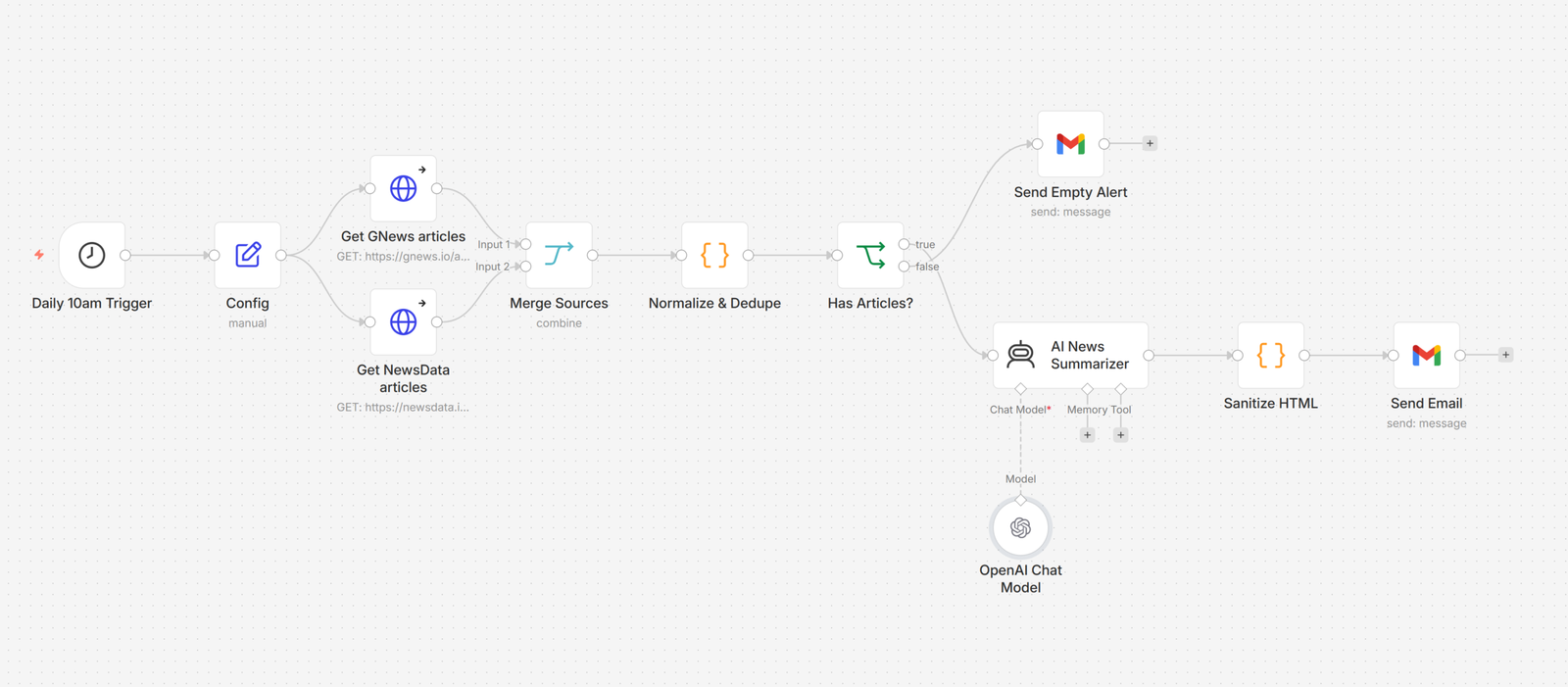
Every morning at 10 AM, the automation wakes up and checks your settings - the topic you want to track, the email address to send to, and how many articles to include.
It then searches two separate news databases at the same time using your topic. Think of it like sending two interns to two different libraries with the same question. Both come back with a stack of articles.
Next, it takes both stacks, removes duplicates, and lines everything up in one clean list. If either source had a problem, it makes a note.
Then an AI reads the full list, picks the best articles, and writes a short summary for each one. It formats everything as a clean email with links back to the original stories. No copy-paste. No formatting headaches.
Finally, it sends the finished digest to your inbox. If nothing was found that day, it sends a short heads-up instead so you know the system is still working and not just silently napping.
Prerequisites
You will need a workflow automation platform to schedule and run the process, two news API accounts to pull articles from, an AI language model to read and summarize, and an email account with API access to send the final digest.
- Automation: n8n, Make, Zapier;
- News APIs: GNews, NewsData.io, NewsAPI;
- AI: OpenAI API, Claude API, Google Gemini;
- Email: Gmail, Outlook, any SMTP provider.
How to Develop Further
- Add RSS feeds: plug in niche blogs or government announcement feeds alongside the two news APIs to catch stories they miss entirely;
- Multi-topic digests: run separate search queries for different topics and merge them into sections inside a single morning email;
- Auto-post to your blog: route the finished digest to your website as a weekly roundup post so your audience sees it with no extra work;
- Slack or Teams delivery: send the digest to a channel instead of email so the whole team sees it where they already spend their day;
- Trend tracking over time: store each day's articles in a database and run a monthly report to spot patterns your competitors are missing.