
Who Is This Automation For?
- Donor relations managers: stop reading 200 survey responses to find the five angry ones - this flags them and drafts your reply;
- Client success leads at small agencies: you promised fast follow-ups but your inbox buries them - this replies in minutes, not days;
- Nonprofit program coordinators: beneficiary feedback sits in a spreadsheet until someone remembers - this acts on it the same hour;
- Freelance consultants juggling client check-ins: you send a feedback form after every project but dread the inbox wave - this handles it;
- Operations directors at growing NGOs: every complaint must be escalated and every compliment acknowledged, but you have one admin, not ten.
Common Use Cases
- Post-event satisfaction surveys: attendees submit feedback after your gala and each one gets a reply that references what they actually said;
- Quarterly donor pulse checks: send a short form to 500 donors - AI sorts who is happy, who is drifting, and who needs a phone call this week;
- Client onboarding follow-ups: new clients fill out a first-month check-in and get a warm, specific response before their coffee gets cold;
- Volunteer experience reviews: after a campaign push, volunteers share what worked and what hurt - complaints reach your team lead right away;
- Product beta feedback rounds: testers submit bugs and praise through the same form and the workflow sorts each into the right reply and alert.
How It Works
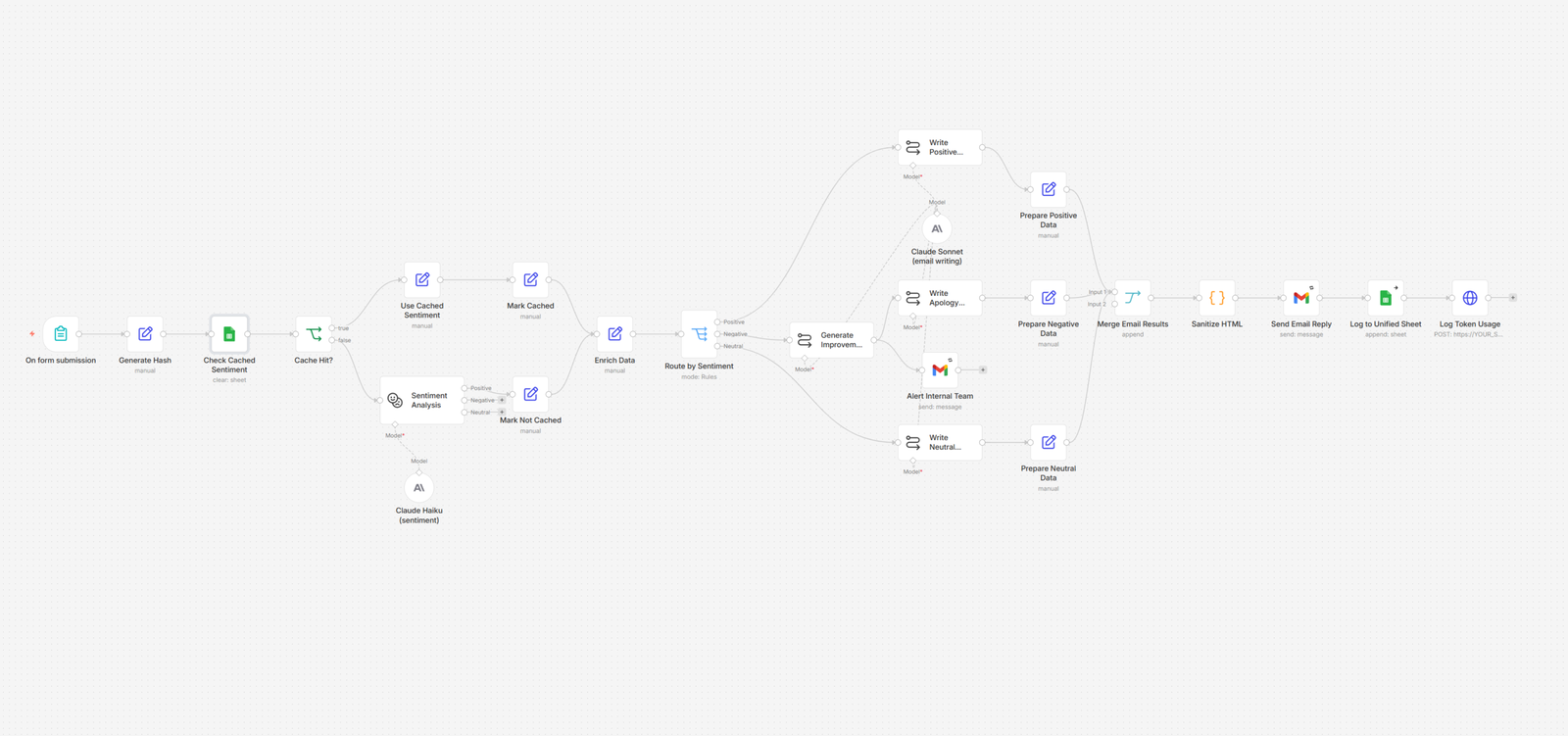
Someone fills out your feedback form. They type their name, email, and whatever is on their mind. That is the only thing a human does in this entire process.
The system reads the feedback and decides how the person feels. Is this happy, unhappy, or somewhere in the middle? It figures that out in seconds. If it has seen this exact feedback before, it skips the analysis and uses the answer it already knows - saving you money on AI calls.
Once sentiment is clear, the workflow takes a different path for each mood. Positive feedback gets a thank-you email that mentions the specific things the person praised. Negative feedback gets a thoughtful reply that acknowledges their concern and tells them a real human will follow up within two business days. You would be surprised how many angry people just want to know someone heard them. Neutral feedback gets a friendly note and contact info for further conversation.
Here is the part your team will love. When feedback is negative, the system also does two extra things. It drafts an internal improvement suggestion based on what the person said - not a generic "do better" note, but something you can act on this week. And it sends an urgent alert to your team with the feedback, the suggestion, and a deadline. No complaint slips through the cracks, even on Fridays at 4:47 PM.
Every submission gets logged to a central spreadsheet with the timestamp, sentiment label, AI suggestion, and a status field. Your team can filter, sort, and report on it. The system even tracks how much each AI call cost, so you always know what the automation is spending.
Prerequisites
You will need a form builder, an email service, a spreadsheet tool, an automation platform, an AI service, and optionally a database for usage tracking.
(Forms: n8n Form Trigger, Tally, Google Forms. Email: Gmail, Outlook. Spreadsheets: Google Sheets, Excel Online. Automation: n8n, Make. AI: Claude API, OpenAI API. Database: Supabase, Airtable.)
How to Develop Further
- Add a chat notification: connect one messaging node after the alert email so your team sees negative feedback in Slack or Teams instantly;
- Build a weekly digest: add a scheduled trigger that reads the spreadsheet every Friday and sends your team a sentiment breakdown for the week;
- Connect to your CRM: push each submission into your donor or client record so the next person who calls them sees their feedback history;
- Create a live dashboard: link the spreadsheet to a chart tool and show sentiment trends on a screen your team checks every morning;
- Add language detection: insert one extra AI step before sentiment analysis to detect the language and route non-English feedback accordingly.